

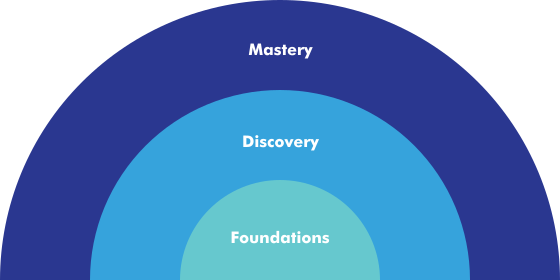
QuiltMotion X Foundations, Discovery, and Mastery

Every feature, in
plain English.

Same hardware on every tier: the tier just unlocks the software.

Foundations

Essential automation for every quilter

Discovery

More control for growing quilters

Mastery

Full professional quilting software

Setup & connection
  • Free-Motion Mode
    Free-motion quilting mode — belts disengage for drag-free hand quilting (belt engagement/disengagement via lead-screw motor).
  • Needle Position Tracking
    Hall-effect position tracking (Halifax sensors), X and Y axes — continuous even while belts are disengaged.
  • Frame Boundary Mapping
    Frame space definition (trace to record boundary) + frame space shrink (measures fabric-roll growth, auto-updates the quilting zone).
  • Over-the-Air Updates
    Over-the-air system updates via app; in-app upgrades; Bluetooth BLE connection to machine hardware.
  • Channel Locks
    Horizontal or vertical axis lock for straight lines.
Design library & store
  • Design Library
    Built-in design library with search, favorites, and organization; design preview before selecting.
  • Grace Design Store
    Grace Design Store — browse, buy, and download patterns; design redownload and refresh.
  • Design Import
    SVG / multi-file-type design import from third-party sources.
Pantograph
  • Simple Pantograph
    Simple panto: pick design type (Block / Simple panto / Line), two-point start & end placement, design-height adjust, flip H/V.
  • Row Height, Spacing, & Count
    Row height, spacing & count controls; design fit — Locked and Stretch modes; margins.
  • Row Stagger & Flip
    Stagger A/B rows (None / 25% / 50% / 75%); flip per row, column, checker, horizontal & vertical; partial designs at edges include/exclude.
  • Full-Quilt Pantograph Planning
    Full-quilt pantograph planning; mark-and-place positioning using physical reference marks or highlighted stitches.
  • Automatic Section Type Detection
    Determined from quilt and frame dimensions.
Zone management
  • Dynamic Zone Capture
    Dynamic zone boundary capture (ABCD corner registration from physical needle position); zone-to-zone pattern continuity across fabric advances.
  • Ghost Overlay Alignment
    Ghost overlay alignment; marking methods (Stitches by corners/ends, Manual marks) with intelligent recommendation; edge compensation at the final zone.
  • Rolling & Hoop-Frame Zone Managers
    Rolling-frame and hoop-frame zone managers (Pro); full-quilt planning before sewing; mark-and-place positioning.
Block quilting
  • Basic Block Placement
    Basic block placement; design fit — Stretch-to-fill and Proportion-lock; rotate & flip controls.
  • Multi-Point Block Placement
    One/two/four-point, on-point, triangle, and 90° angle placement; margins; sew-ditch option.
  • Multi-Block Sequencing
    Multi-block workflow — place and sequence multiple blocks.
Custom quilting & lines
  • Straight Line Stitching
    Stitch a straight line between two points; line design height and flip controls.
  • Custom Shape Drawing
    Draw custom closed shapes / open lines / single points; assign block or pantograph designs; auto-fit with stretch or proportion lock; orientation inference.
  • P2P Continuous Path Stitching
    P2P closed-shape placement; unified center-point adjust; continuous single-path stitching; sew-order drag-to-reorder; copy/paste across elements.
  • Sew Shape Border
    Option to stitch along the border of a custom shape.
  • Reverse Endpoints
    Flip the start and end point of a placed design.
  • Multi-Design Sew Order
    Choose which design sews next on a canvas with multiple designs.
Optimize & preview
  • Stitch Path Preview
    Preview stitching path before sewing; travel-line visualization.
  • Sew-Flow Optimization
    Sew-flow optimization; sewing direction control (left-to-right or back-and-forth).
  • Advanced Sew-Order Optimization
    Advanced optimization — sew-order reordering, continuous-line detection.
Sewing controls
  • Prepare to Sew
    Prepare to sew: pull bobbin, move to start, single-stitch check.
  • Pause & Resume Stitching
    Start stitching with real-time progress bar (percentage and stitch count); pause and resume mid-stitch.
  • SPI, Speed & Tie-Off Controls
    SPI control; securing stitch (micro-stitch or back-and-forth); sew speed (slow/medium/fast); tie-off settings; send design to machine via BLE.
Repair & recovery
  • Repair from Break Point
    Repair design — navigate by path number to the break point; stitch repair resumes from the stop point.
  • Manual Repair Controls
    Repair controls (Last / Closest / Back / Forward); nudge tool; single stitch during repair.
Pro tools & projects
  • End Point Adjust
    End point adjust — correct where a pattern ends before sewing.
  • Fabric Compensation
    Fabric compensation — mark compensation points to correct fabric distortion.
  • Save and Reopen Project Designs
    Save the project designs with their attributes like tilt, size, and more.
  • Save and Reopen Project Zones
    Save your project designs and their details relative to their specific zone placement.
  • Digital Ruler
    Have the tools at hand to measure your digital quilting space and see that relative to your real space.
  • Show Actual Size
    Show the actual size of your design relative to your quilt.
  • Undo & Redo / Reset View / Confirm & Continue
    Place again, pick a new design, or restart.
Not sure where to start?

Which QMX is right for you?

Answer a few simple questions and we'll help you find the QMX tier that fits the way you quilt today.
Takes less than 1 minute.
  • Easier to learn

    Designed to build confidence, not test patience.

  • Most accessible in its class

    Start small and grow anytime, tier by tier.

  • Backed by Grace

    Decades of quilting engineering, dealers, and education behind you.
1 / 3

How would you describe your quilting experience?

What do you want QMX to help you do?

What sounds most like you?

Based on your answers, we recommend

Foundations

You want a simple way to get started with automated quilting. Foundations gives you the essential tools you need to start quilting with QMX.
You can change tiers later.
All tiers use the same QMX automation hardware.
More ways to create
Smarter, faster workflows
A growing design library
Deeper customization
& plenty more to come

More innovations are on the way.

QuiltMotion X keeps growing with free updates: new tools and fresh creative possibilities, dreamed up alongside quilters. We're always building, so the best of QMX is still ahead. We're not putting dates on it yet, just know there's a lot to look forward to.

Ready to choose your QMX?